
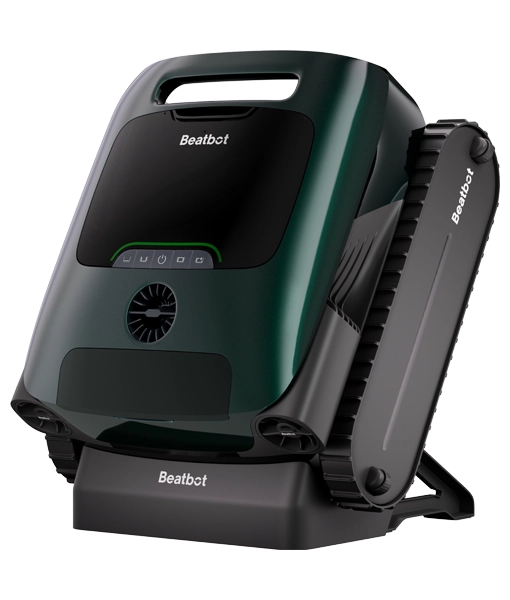


Beatbot AquaSense 2 Pro Intelligent 5-in-1 Robot Pool Cleaner


18 in stock
Documents
Product overview
The Beatbot AquaSense 2 Pro meticulously cleans every surface of your pool, from the bottom of the floor gradient to the top of the waterline. This intelligent cleaner learns the unique shape of your pool, then eliminates everything from fine silt to stubborn stains. Offering a professional level of cleaning that redefines what you should expect from your pool robot, leaving you with nothing to do but enjoy your pool.
- 22 high precision sensors including 2 ultrasonic sensors for advanced obstacle detection, navigation and no missed spots
- Huge 13,400mAh capacity battery provides up to 5 hours of continuous floor cleaning, or 11 hours of continuous surface cleaning on a single charge
- Two layer filtration system captures everything, from loose leaves to tiny particles for a thorough clean
- Automatically returns to the surface when cleaning is complete or the battery is low, and water is automatically drained so there is no more heavy lifting
- Advanced cleaning control with the Beatbot App, choose additional cleaning modes, one click pool edge parking, track cleaning cycles and stay up to date with software updates, plus register for your three year warranty
- Upgraded wall motion stability to help climb any pool surface, scrubs the waterline twice during each pass
- Water clarification clears dirt, oils and residue using natural agents that bind fine particles for better filtration, one kit included with replacements available separately
Buttons & lighting effectsTap the button and explore the controls
Buttons & lighting effects
Click the power button to begin
Floor ModeSingle press selects floor cleaningLonger press (3 secs) activates clarifier
Standard ModeSingle press selects floor, walls and waterline cleaning
PowerShort press powers onLonger press powers off
Pro ModeSingle press selects floor, walls, waterline and surface cleaningLonger press (3 secs) manual draining (shows battery status)
Custom ModeSingle press selects custom cleaning (area and duration must be set in Beatbot App)
Solid greenBattery is charged
Solid yellowBattery is getting low
Solid orangePlease charge the battery
Breathing lightBattery is charging (orange, yellow or green shows the charge level)
Flashing blueConnecting to Wi-Fi or updating firmware (for Wi-Fi setup, press and hold Power + Floor Mode for 3 secs)
Flashing orangeFault (please contact us, cleaners connected to the Beatbot app can be diagnosed remotely)
Quick start guide
In the box
- Beatbot AquaSense 2 Pro
- 1 x Clarifying agent kit
- Charging dock and cable
- Hook
- User Manual
- Quick Start Guide
Set up the dock and charge
- Push the bracket up into the groove on the back of the dock until it clicks.
- Plug the dock in.
- Sit the robot on the dock and a breathing light shows it’s charging. A full charge takes around 4 to 4.5 hours, and the light turns solid green when it’s ready.
Connect to the Beatbot app
- Download the Beatbot app from the App Store or Google Play.
- Switch the robot on, and make sure your phone is on a strong Wi-Fi signal and within a metre of the robot.
- Hold Power and Floor Mode together for 3 seconds, until the light flashes blue.
- In the app, tap Add Device and it will find the robot by Bluetooth, or tap Scan to Add and scan the QR code on the robot. Then follow the app, and don’t forget to register your warranty while you’re there.
Start a clean
- Check the robot is charged, the light should be solid green.
- Press a mode button on the robot, or choose a mode in the app.
- Place the robot on level ground and wait around 5 seconds while it calibrates, this helps it plan the most efficient path around your pool.
- Lower the robot gently into the water and it will start cleaning on its own.
Lift the robot out and empty the filter
- When the robot has finished, it will park on the surface at the edge of the pool. You can also guide the robot to the edge with the app or lift it out with the hook.
- Lift the robot out gently by the handle, the water will drain out by itself.
- Open the top cover, lift out the filter basket and empty it, then separate the inner and outer baskets, rinse both and refit them.
- Once the robot is dry, put it back on the dock ready for next time. Every so often clear any hair or sand from the propellers (they come off for cleaning), the water outlet and the brushes, and give the sensors a wipe.
Fit the clarifier (optional)
- Open the clarifier kit, remove the cap and peel off the foil.
- Open the clarifier cover on the robot, press the kit into place with the opening facing down until it clicks, then close the cover.
- Press and hold Floor Mode for 3 secs to activate the clarifier, the light will turn purple, the cleaner will automatically dispense the clarifier during its cycle. Press and hold again to deactivate the clarifier.
FAQs
Should the pool pump be running while the robot is cleaning?
For the best results turn your filtration equipment off while the robot is cleaning, the currents created by the pump can interfere with the robot’s movement and stop it covering the whole pool.
Can we swim while the robot is cleaning?
No, please stay out of the pool until the robot has finished, then you can enjoy the pool knowing it’s been cleaned.
What should I do before the first clean of the season?
After winter it’s worth removing any larger debris such as leaves by hand first, this stops the filter basket filling up too quickly and lets the robot get on with the fine cleaning.
Why does the robot take a few minutes to sink?
When the robot is placed into the water the air from inside will need to be expelled, so please allow around 3 minutes and the cleaner will then settle on the floor and start its cycle.
Why does the robot make a noise before and after cleaning?
This is perfectly normal, the noise before each cycle is the robot expelling trapped air and afterwards the cleaner takes around 3 minutes to expel the trapped water, saving you from lifting a heavy, water-filled cleaner.
Why does the app lose connection while the robot is cleaning?
Wi-Fi can’t travel through water, so the robot will drop out of the app while it’s under the surface, once it surfaces it reconnects automatically and updates the app with its cleaning data.
The robot has stopped or is barely moving, what should I check?
In the rare instance the cleaner stops moving, check for obstructions such as a drain cover, make sure the filter basket isn’t full and that the pool pump is switched off. If the robot hasn’t freed itself after a few minutes, use the hook to lift it clear and it will carry on cleaning.
The robot won’t charge, what should I check?
Make sure the dock is plugged in, the robot is located on the dock correctly, and the charging pins are clean. The robot will only charge between 0 and 40°C, in cold weather please do not charge the robot outside or in unheated outhouses.
Why is the robot showing offline in the app?
This is normally due to a weak Wi-Fi signal, the battery needing charging, the robot being linked to another account or a change to your router’s name or password. If the robot stays offline, reset its Wi-Fi and reconnect it to the app.
Will the robot remove algae?
Robot pool cleaners will not fully remove algae from your pool, so algae should always be treated and removed manually before using a robot cleaner, please note that cleaners may not move correctly across algae covered surfaces. Used regularly a robot cleaner can help to prevent the regrowth of algae alongside filtration and correct water chemistry.
Do I have to use the clarifier?
No, the clarifier is optional, it is designed to help remove unseen oils from makeup and sun cream in the water and is only dispensed when you activate it, by pressing and holding Floor Mode for 3 secs. Once a kit is opened it should be replaced within 30 days even if it’s not used up, so it’s worth only opening one when you’re ready to use it, replacement kits are available separately.
How should I store the robot over winter?
Drain the robot fully by pressing and holding Pro Mode for 3 secs, switch it off, then store it indoors somewhere cool, dry and frost-free. Check the battery at least every 6 months and charge it to around 50%, this keeps the battery healthy and ready for next season.
Do I need to register the robot for the warranty?
Yes, the three year full replacement warranty requires the cleaner to be registered, please download and connect to the Beatbot app to register your robot, being connected also allows faults to be diagnosed remotely and additional cleaning modes to be selected.
Specifications
| Pool size | Up to 360m² (floor) |
|---|---|
| Surfaces | Floor, walls, waterline and surface |
| Sensors | 22 sensors |
| Cycle time | 5 hours (floor or walls & waterline) / 11 hours (surface) |
| Cable | Cordless |
| Brushes | 4 x bottom (2 x 2) / 1 x front |
| Weight | 11.38kg |
| Motors | 9 |
| Battery | Lithium-ion 13,400mAh |
| Filtration | Outer 3.7L (250 μm) / Inner 3.5L (150 μm) |
| Charging | Approx. 4.5h, quick 88W charging |
| Charger output | 28V / 3A |
| Connectivity | Wi-Fi (2.4/5GHz) + Bluetooth (Beatbot App) |
| Protection | IP68 (robot) / IPX4 (charger) |
| Warranty | 3 years full replacement |
Compatibility
| Maximum pool size | Up to 360m² (floor) |
|---|---|
| Minimum depth | 50cm |
| In-ground pools | Yes |
| Above-ground pools | Rigid sides only |
| Wooden pools | Yes |
| Liner pools | Yes |
| Rough tiled pools | Yes |
| Fibreglass pools | Yes |
| Coated concrete pools | Yes |
| Smooth tiled pools | Yes |
| Chlorine | Max 4 ppm / NaCl max 5000 ppm |
| pH | 7.0 – 7.8 |
| Water temperature | 6 – 35°C |
Documents
Three years full replacement warranty, requires the cleaner to be registered and connected to the Beatbot App